Flutter
Setting up your project
There are a few requirements for a flutter project that wants to implement the InvestSuite SDK.
- Make sure that you are using flutter 3.13 or later (3.16.5 is recommended). If you want to be able to easily manage the flutter versions on your machine we can recommend Flutter Version Manager (fvm).
Creating an example project
A quick example of setting up a project could look something like this. For the name of our project we will choose investsuite_flutter_embedding_example.
- Create the directory
mkdir investsuite_flutter_embedding_example - Navigate to the directory
cd investsuite_flutter_embedding_example - Run your project creation command:
fvm use 3.16.5 --force(--force is required because your current directory is no flutter project yet) - Run your project creation command:
fvm flutter create . - After creation, verify that your project is setup correctly by running it on both Android and iOS (simulators). If you get errors here (regarding simulator setup, for example) fix these first. Since they have nothing to do with the InvestSuite SDK but might become confusing later.
- Check for device ids:
fvm flutter devices - Run on Android:
fvm flutter run -d <android_device_id> - Run on iOS:
fvm flutter run -d <ios_device_id>
- Check for device ids:
Download the InvestSuite SDK from your Codemagic dashboard
The InvestSuite team will provide you with a Codemagic dashboard where you can download (new) versions of the SDK as we release them. Download the latest one and store it in a convenient location where you can easily access it later.
Unzip the “artifacts” file you downloaded from Codemagic. This should give you a .zip file that looks something like this:
The version number will of course vary based on which version you’re loading.
If you unzip this file you’ll not only find the SDK packages, but also a fully working example flutter project that embeds the InvestSuite SDK and gives you a nice boilerplate to the steps we explain in step 6: Usage of the add-to-app SDK.
In order to continue with this step-by-step guide. We assume you place the unzipped folder here:
packages/investsuite_module
Install the SDK as a dependency
Add the following to your pubspec.yaml file in your dependencies:
dependencies:
  #...
  investsuite_module:
    path: ../packages/investsuite_module
  #...
Changes to your iOS project
As of now iOS doesn't require any changes to your project.
Changes to your Android project
Warning
To be completed and updated
Set the mindSdkVersion to at least 22 in build.gradle. minSdkVersion = 22
Usage of the add-to-app SDK
If you have the setup done, it is time to start playing around! The SDK exists out of two main parts:
InvestSuiteApp: This is a Flutter widget that renders the application. You can use it in your own application widgets where you wish to render the views of the Add-to-App SDKInvestSuiteEmbeddingController: This is a controller that allows you to interact with the application that is shown in theInvestSuiteAppInvestSuiteEmbeddingHandoverCallbacks: This is a class that receives callbacks when navigation should happen to screen,popup,dialog that is maintained by theSuperApp
We recommend to create a seperate widget to bundle everything together. This widget should contain the InvestSuiteApp and the InvestSuiteEmbeddingController. This widget can then be used in your application.
Minimal example on how to use the sdk
import 'package:flutter/material.dart';
import 'package:investsuite_flutter_embedding_example/example_embedding_controller.dart';
import 'package:investsuite_module/investsuite_module.dart';

class InvestSuiteAppWidget extends StatelessWidget {
final InvestSuiteFlavor flavor;
final ExampleEmbeddingController embeddingController;
final InvestSuiteEmbeddingNavigatorActionController embeddingNavigatorActionController;

const InvestSuiteAppWidget({
    required this.flavor,
    required this.embeddingController,
    required this.embeddingNavigatorActionController,
    super.key,
});

@override
Widget build(BuildContext context) {
    return InvestSuiteApp(
        flavor: flavor,
        embeddingController: embeddingController,
        embeddingNavigatorActionController: embeddingNavigatorActionController,
        loadingPageBuilder: (context) => const Scaffold(
            backgroundColor: Colors.white,
            body: Center(
            child: CircularProgressIndicator(),
            ),
        ),
        );
    }
}
import 'package:flutter/foundation.dart';
import 'package:investsuite_flutter_embedding_example/debug/logger/handover_logger.dart';
import 'package:investsuite_module_cbd/investsuite_module_cbd.dart';

class ExampleEmbeddingController extends InvestSuiteEmbeddingController {
    final AsyncValueGetter<String> accessTokenCallback;
    final AsyncValueGetter<String> anonymousAccessTokenCallback;

    ExampleEmbeddingController({
        required this.accessTokenCallback,
        required this.anonymousAccessTokenCallback,
        required InvestSuiteEmbeddingHandoverCallbacks handoverCallbacks,
    }) {
        init(handoverCallbacks);
    }

    @override
    Future<String?> provideAccessToken() => HandoverLogger.run(
            'provideAccessToken',
            null,
            accessTokenCallback,
        );

    @override
    Future<String> provideAnonymousAccessToken() => HandoverLogger.run(
            'provideAnonymousAccessToken',
            null,
            anonymousAccessTokenCallback,
        );

    @override
    void receiveAnalyticsEvent(AnalyticsEvent event) => HandoverLogger.addHandoverLog(
            'receiveAnalyticsEvent',
            arguments: event,
        );

    @override
    void receiveDebugLog(DebugLogRequest request) => HandoverLogger.addHandoverLog(
            'receiveDebugLog',
            arguments: request,
        );

    @override
    void receiveError(ErrorReqeust request) => HandoverLogger.addHandoverLog(
            'receiveError',
            arguments: request,
        );
}
import 'package:flutter/material.dart';
import 'package:investsuite_flutter_embedding_example/debug/logger/handover_logger.dart';
import 'package:investsuite_flutter_embedding_example/debug/screens/faq_screen.dart';
import 'package:investsuite_flutter_embedding_example/debug/screens/start_funding_portfolio_screen.dart';
import 'package:investsuite_flutter_embedding_example/debug/screens/start_onboarding_screen.dart';
import 'package:investsuite_flutter_embedding_example/debug/screens/start_authorization_screen.dart';
import 'package:investsuite_flutter_embedding_example/debug/screens/start_add_money_screen.dart';
import 'package:investsuite_module_cbd/investsuite_module_cbd.dart';

mixin EmbeddingHandoverCallbacksMixin<T extends StatefulWidget> on State<T> implements InvestSuiteEmbeddingHandoverCallbacks {
    @override
    void onExit() {
        HandoverLogger.addHandoverLog('onExit');
        Navigator.of(context).pop();
    }

    @override
    Future<OnboardingResponse> startOnboarding(OnboardingRequest request) => HandoverLogger.run(
            'startOnboarding',
            request,
            () => _push((context) => StartOnboardingScreen(request: request)),
        );

    @override
    Future<AuthorizationResponse> startAuthorization() => HandoverLogger.run(
            'startAuthorization',
            null,
            () => _push((context) => const StartAuthorizationScreen()),
        );

    @override
    Future<AddMoneyResponse> startAddMoney(
        AddMoneyRequest request,
    ) =>
        HandoverLogger.run(
            'startAddMoney',
            request,
            () => _push(
            (context) => StartAddMoneyScreen(request: request),
            ),
        );

    @override
    Future<FundPortfolioResponse> startFundPortfolio(
        FundPortfolioRequest request,
    ) =>
        HandoverLogger.run(
            'startFundPortfolio',
            request,
            () => _push((context) => StartFundPortfolioScreen(request: request)),
        );

    @override
    Future<void> startFaq(FaqRequest request) async {
        HandoverLogger.addHandoverLog(
        'startFaq',
        arguments: request,
        );
        await _push((context) => FaqScreen(request: request));
    }

    Future<E> _push<E>(WidgetBuilder builder) async {
        final result = await Navigator.of(context).push(MaterialPageRoute(builder: builder));
        if (result == null) {
        throw Exception('Failed to get $E restult');
        }
        return result;
    }
}
class ExampleEmbeddingNavigatorActionController extends InvestSuiteEmbeddingNavigatorActionController
    with InvestSuiteRoboNavigatorActions {}
InvestSuiteApp
Using the InvestSuiteApp should be fairly straightforward since it is a normal Flutter Widget
    InvestSuiteApp(
      flavor: ...,
      embeddingController: ...,
      loadingPageBuilder: (context) => ...,
    );
flavor
The InvestSuiteFlavor is used to determine which environment the SDK should use.
embeddingController
The InvestSuiteEmbeddingController is used to communicate with the SDK.
loadingPageBuilder
The loadingPageBuilder is used to show a loading page while the SDK is starting up. This is a builder function that should return a Widget.
InvestSuiteEmbeddingController
The InvestSuiteEmbeddingController is used to communicate with the SDK. Any method called on the controller should only be called if the InvestSuiteApp is open somewhere in your widget tree.
It has the following methods:
init
void init(InvestSuiteEmbeddingHandoverCallbacks handoverCallbacks); should be called before any other method is called on the controller. It is used to initialize the controller with the InvestSuiteEmbeddingHandoverCallbacks that are used to communicate with the SDK.
provideAccessToken
Future<String?> provideAccessToken(); will be called when an access token is needed. It should return a Future<String?> that contains the access token.
provideAnonymousAccessToken
Future<String> provideAnonymousAccessToken(); will be called when an anonymous access token is needed. It should return a Future<String> that contains the anonymous access token.
receiveAnalyticsEvent
void receiveAnalyticsEvent(AnalyticsEvent event); will be called when an analytics event should be logged by the host app.
receiveDebugLog
void receiveDebugLog(InvestSuiteDebugLogRequest request); will be called when a debug log should be logged by the host app.
receiveError
void receiveError(InvestSuiteErrorRequest request); will be called when an error should be logged by the host app.
changeLanguage
Future<bool> changeLanguage(Locale locale); should be called when you want to change the language of the SDK. It should return a Future<bool> that indicates if the language change was successful.
handleNotification
Future<bool> changeLanguage(Locale locale); should be called when you want to change the language of the SDK. It should return a Future<bool> that indicates if the language change was successful.
reset
Future<void> reset({bool clearData = false}); should be called when you want to reset the SDK.
InvestSuiteEmbeddingHandoverCallbacks
There are multiple ways to implement this and handle HandoverCallbacks. (Navigation to specific screens and return a specific result) We recommend to use a mixin that can directy access the navigator? Or get your navigation instance from somewhere else.
onExit
void onExit() will be called when the SDK wants to exit. This should be used to close the SDK. (In most cases this will be a Navigator.pop())
startOnboarding
Future<InvestSuiteOnboardingResponse> startOnboarding(InvestSuiteOnboardingRequest request) will be called when the SDK wants to start the onboarding flow with an OnboardingRequest. This should be used to navigate to the onboarding flow and return the OnboardingResponse when the flow is finished.
startAuthorization
Future<AuthorizationResponse> startAuthorization() will be called when the SDK wants to start the authorization flow. This should be used to navigate to the authorization flow and return the AuthorizationResponse when the flow is finished.
startFundPortfolio
Future<InvestSuiteAddMoneyResponse> startAddMoney(InvestSuiteAddMoneyRequest request) will be called when the SDK wants to start the add money flow with an AddMoneyRequest. This should be used to navigate to the add money flow and return the AddMoneyResponse when the flow is finished.
startFaq
Future<InvestSuiteFundPortfolioResponse> startFundPortfolio(InvestSuiteFundPortfolioRequest request) will be called when the SDK wants to start the fund portfolio flow with an InvestSuiteFundPortfolioRequest. This should be used to navigate to the fund portfolio flow and return the InvestSuiteFundPortfolioResponse when the flow is finished.
startFaq
Future<void> startFaq(InvestSuiteFaqRequest request) will be called when the SDK wants to start the faq flow with an InvestSuiteFaqRequest. This should be used to navigate to the faq flow and return when the flow is finished.
Example app
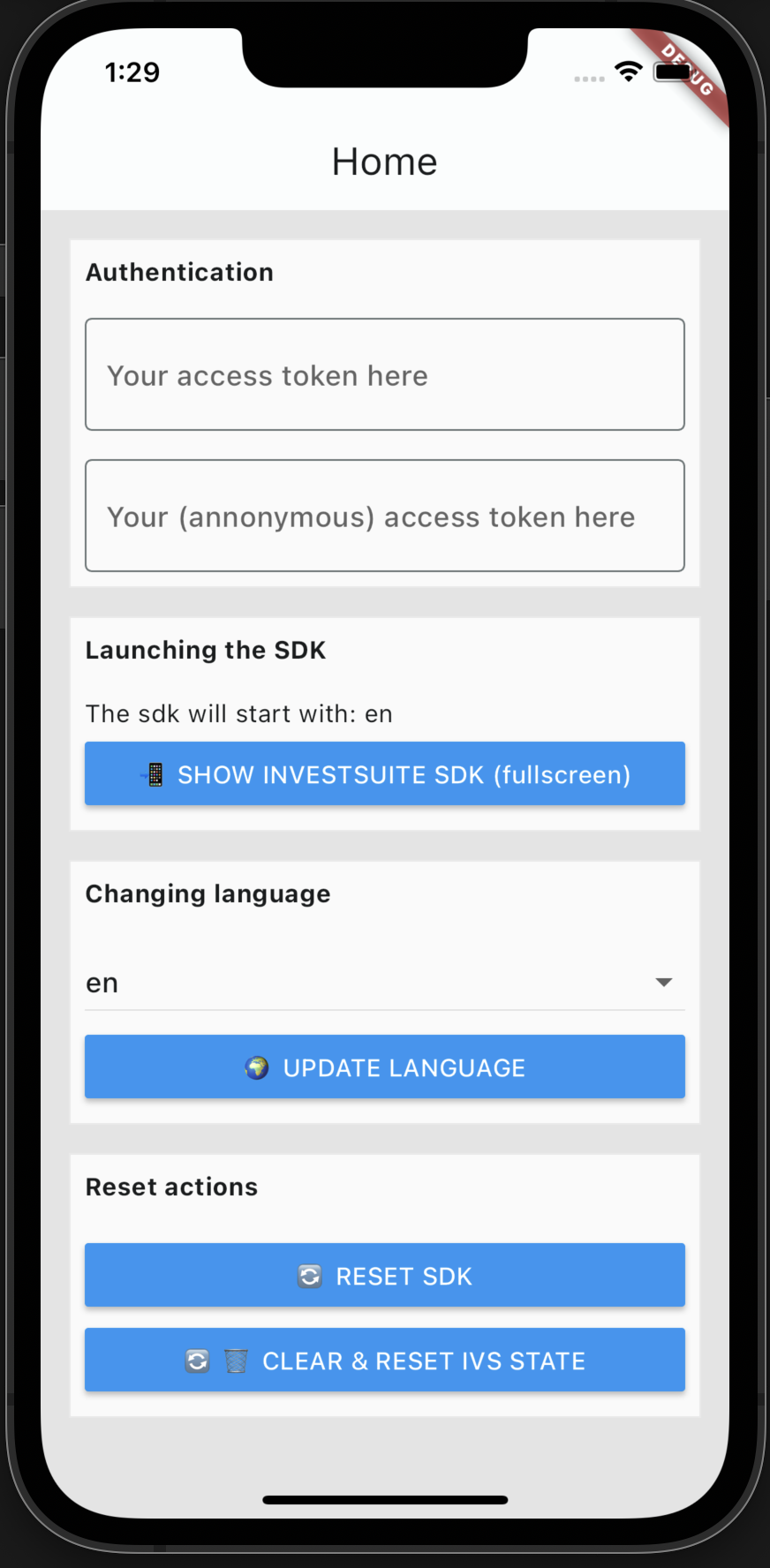
Each SDK embedding module ships with a functional example app that shows how to use the SDK.
You can find this by unzipping the .zip file you downloaded from Codemagic inside the example folder.
In order to use this app you should cd into the example folder. run fvm flutter packages get.
This will resolve all dependencies for the example app, all packages are based on path.
After this you can run the example app on your device by running fvm flutter run -d <device_id>.
You will now be able to browse a nice example app which looks something like this: