Application Offering
General
The InvestSuite front-end application is built using the Flutter Framework. Flutter is a multi-platform open-source framework built and maintained by Google. Since the platform uses it’s own rendering engine (impeller) that renders a full UI on a canvas, no links need to be made to native components or a virtual DOM. This leads to a more performant multi-platform app then alternatives.
With Flutter we still have the possibility to connect to native SDKs of the Platform we deploy to.
Different types of applications
Since Flutter supports multiple platforms, we take full advantage of that. Currently we deploy the applications to mobile devices (both Android and iOS) and web. From a purely technical standpoint it would also be possible to deploy the app as a desktop application, but we don’t currently do that.
The architecture of the IVS applications
The InvestSuite application is built with a plug-in architecture. The easiest way to explain that is to imagine the application as individual Legos. We provide a base structure to bootstrap the application and deal with shared functionality called investsuite_sdk_core. Plugins can register themselves on this core application, from which they can be started, or embedded in to user flows by implementing generic interfaces defined in the core package. A plugin can be pretty much anything, but the two largest ones are our investsuite_sdk_robo and investsuite_sdk_self . As the name suggests these are the Robo - and Self Investor applications.
Other plugins can be for example different authentication providers, or different payment flows.
Each application that is set up for a tenant is some combination of the investsuite_sdk_core, with plugins, a specific config and theming. d
Communication with the IVS backend
The InvestSuite application uses gRPC protocol to communicate with the InvestSuite API services.
There are multiple advantages to this setup. For starters it is fast, secure and allows for bi-directional streaming which is essential for our products.
The message types used in the gRPC communication are built using protocol buffers. The great thing about this is that protocol buffers allow you to have an unbreakable contract between client and server. This leads to data consistency and less errors. The message that is being composed on the server uses the exact same types as one that is received and decoded by the client!
Configurations of the Application
The applications are highly configurable. This configuration divides into 3 sections for each plugin.
- Data: This is simple data configuration. e.g. URLs, amount limits, amount of fractional digits,…
- Features: These are feature flags. They allow you to turn certain features in the application on or off.
- Mocks: Mostly used during development. Each API call that the application does first goes through a mocked service. This mocked service has the potential, based on the configuration, to return a stubbed result rather than actually calling the API. This is very useful during development (when backend services might not be available yet) or testing (when you might want to force a certain, uncommon result).
A full list of all the possible configurations for the different plugins can be found here: TODO: Link.
Configurations of the applications with regards to branding and UI/UX.
Once again, the application is highly configurable in this area. Since the application is build from the ground up to be as configurable as possible, quite a bit is possible. Some things need to be kept in mind though:
- Data is everything: The underlying data supplied to the application is the same and is bound by strict contacts. While not advisable we could pass more extensive data to the client and then decide not to show it, the other way around is simply not possible. Extensive changes to the structure or nature of the data being shown in the app will lead to custom development and this always comes at a cost.
- Customisation comes at a cost: Going further than the normal branding of an application is possible but new widgets / screens / flows will need to be build and maintained. This always comes at a cost and is not necessarily the best way forward.
All of the applications are build on a design system with a style guide. When it comes to the UI/UX there are many different levels that we allow customisation of the app.
First we will discuss theming and branding because they are in the standard offering.
Theming and branding
When we’re talking about theming and branding, we’re mainly talking about the style guide part of the design system within the app. The style guide covers a set of tokenised values. This means that we have generic key-value pairs that are being referenced from the code. While the keys will remain the same we can customise the values at will and drastically change the overall look and feel of the application by doing it.
With this style guide we apply the best principles of material design and then some. By working this way we ensure that the generic tokens have a functional relationship with each other. This in turn ensures that we don’t run into unexpected results when applying a theme for a tenant. (for example, unexpected low contrast between background and foreground colours).
The style guide covers the following areas:
- Colors
- Fonts and typography
- Icons
- Illustrations (we’re using illustrations as a broad term here. It covers illustrations, photos, and even Rive animations.)
Soon we will also have out-of-the box support for light and dark themes, and themes that can switch based on the operating system of the device. (While already technically possible they still require custom development to properly work, not a simpel config yet)
Customisation in UX and UI
This is not part of the standard offering because at this point customisation of the UI/UX, while possible, requires custom development work. In the future we aim to offer a set of default widgets that can be part of the configuration progress, but currently they are not available yet.
To understand how this works, we first need to give a short technical explanation about the Flutter framework. Within the framework everything is a widget. Flutter then builds a massive widget tree out of all of these widgets and these ultimately compose your app. The fact that everything is build as one large widget tree means that we can pass data down the tree using InheritedWidgets. Within the InvestSuite applications we use this Provider > Consumer pattern to push tokenisation to a next level. Almost all of the widgets/components used in the application are tokenised, and can thus potentially be overridden with a different widget. If we disregard the creating and maintaining of the actual widget, this can still be considered a configuration, since the internal source code doesn’t actually change. It just receives a widget that implements a certain interface.
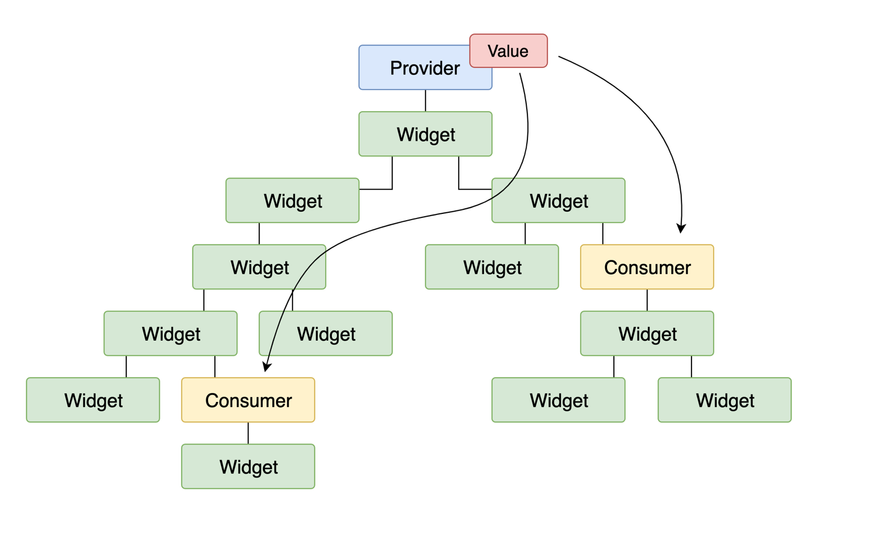
The options to customise UI don’t end there though. Within this same pattern all of our screens are also tokenised. It is possible to replace certain screens with a different layout if really required. (if certain information really cannot be shown, for example). Keep in mind here though that data is still everything.
Finally then, customisations to UX. If we consider a slightly more narrow aspect of the UX and we limit that to simply the user flows than yes, some of these can be customised because they too - you guessed it - are tokenised. When it comes to entire flows however we’re not really talking about config anymore but custom development since we’re lifting out entire parts of the app to be replaced with different functionality. The locations where this is possible is rather limited and comes at a high cost because completely new flows would have to be developed.
Localisation of the application
Every label that is shown in the app is localised. On top of that we have full RTL/LTR reading support which extends to the UI and all of it’s assets. With this in the back of our heads we can technically support all the languages you would want, but that doesn’t mean that we already have a fully translated version ready.
Here’s an overview of the languages that we currently have:
Language | BCP-47 Locale identifiers | Status |
|---|---|---|
English |
|
|
Turkish |
|
|
Arabic |
|
|
中文 |
|
|
Spanish |
|
|
German |
|
|
Greek |
|
|
Dutch |
|
|
French |
|
|


A tenant is always able to change labels at will. However: some of these labels are static and are compiled within the app binary when it is submitted to the stores. In order to update these labels a new release needs to be made. This can take some time depending on where in the release cycle we are.
Mobile application offering
Standalone
This is the most common version of an app. The IVS application will be branded and themed to reflect the tenant’s brand, it will get a name and will ultimately be released in the relevant marketplaces. (Appstore for Apple, PlayStore for Android). When a user downloads this app to their phone it will become available on their homescreen.
The standalone apps share the same codebase, even though they are ultimately shipped to OS-specific stores.
The theming and branding of these apps is bound to the same rules described earlier in this document
Certain areas of a standalone application deserve a little bit of extra attention as they always need to be configured and require extra work every setup.
- Authentication and Authorization
- Onboarding
- Contract Signing
- Funding (Invest/Withdraw)
Mobile application delivery
Environments
We usually set up multiple testing environments for each tenant application. Not all of these environments are available for the testing teams at the tenant’s side since they are deemed “too unstable” and really just serve as a testing platform for our internal QA-team.
These environments coexist with internal environments but are used to test our software against the various client configurations.
Here’s an overview of the different environments that we could have, and their use in the application deployment process.
| Environment | Uses |
| DEV | Development: This environment is used for active development and can be considered unstable at all times. Even tough we have rigorous code reviewing and testing practices in place, something always slips through the cracks and this is the first place we catch those errors. |
| TST | Testing: Once we are preparing a new release of our codebase, we promote it to the TST environment. This environment is deemed “stable” but is undergoing testing and stabilisation at all times as our QA-team tests the full extend of new features and regressions on the code base. At the end of one of these cycles, when the code is battle tested on this environment, it gets promoted to the next one. |
| UAT | User Acceptance Testing: This is the first environment where tenants can test, and considered the last of the environments where IVS decides about deployments. Usually a select group of testers gets access on the tenant’s side (almost always internal people, and people close to the project). On this environment they get to try out the new features, and play around with the app. Possible bugs can be reported to the IVS team who will pick them up and fix these. Promotion from this environment to a higher level environment is always in the hands of the tenant. It’s up to them to decide when the application is deemed stable enough. |
| PILOT | Pilot: For most tenants this is a temporary environment when we’re first launching the app. It has the same status as a full production environment, but allows you to use a select user base of alpha testers. Usually these are people who are close to the bank and considered “trusted”. (Friends and family, good / large customers, etc.). Consider this as a platform to gain trust in the product before releasing it to the audience at large. |
| PROD | Production: his is the live environment. It’s where the full audience of the tenant has access to the application and the final station of a build. |
Delivery for standalone applications
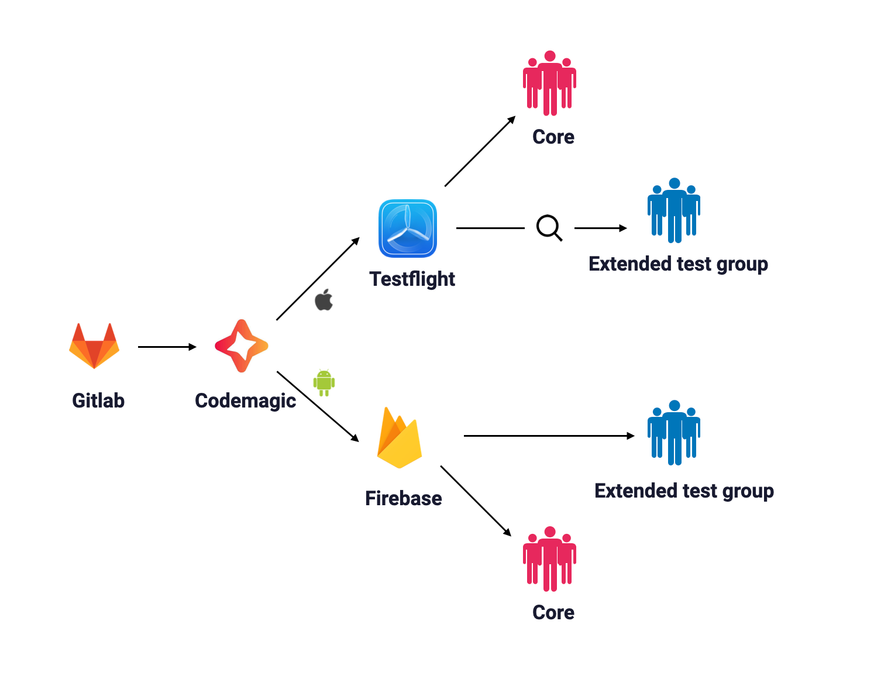
Applications are delivered through a series of pipelines and automated processes. here’s how that works for the lower environments (DEV trough UAT)
-
Our Gitlab pipelines run after each code change. If necessary they will create new tags that serve as an anchor point for a certain version of a code. We use semantic versioning so we always have a sound point to pick up and add new features or fix bugs.
-
Codemagic is a build tool. It will pick up these tags and code changes published by Gitlab and prepare a relevant build. The lower environments are automated, the higher ones not (because we want more control over those.). Codemagic is the first place where we make a difference between the OS we’re building for because this is where the actual binaries for each platform are created.
-
Testing platforms
-
Testflight is Apple’s testing platform. Think of it as a “pre app store”. It allows you to easily switch between different versions of the app. When a build is first arriving on the platform it is automatically available to the core test group. This is IVS' internal test group. It exists of the QA team and the developers. After a review from Apple the build can be made available to the larger test audience, which exists of more people within InvestSuite as well as select people from the tenant. One of these reviews from Apple can take up to 48 hours (and more, but usually happens within 8 hours).
-
Firebase (app distribution) is Google’s testing platform. It has the same functionalities as Testflight and can do iOS delivery too but is usually used for Android delivery. At first it will also deliver the app to the core testing team, after which it is made available to the extended group. Firebase does not do an additional testing round which means it will usually arrive a bit sooner than the iOS builds.
-
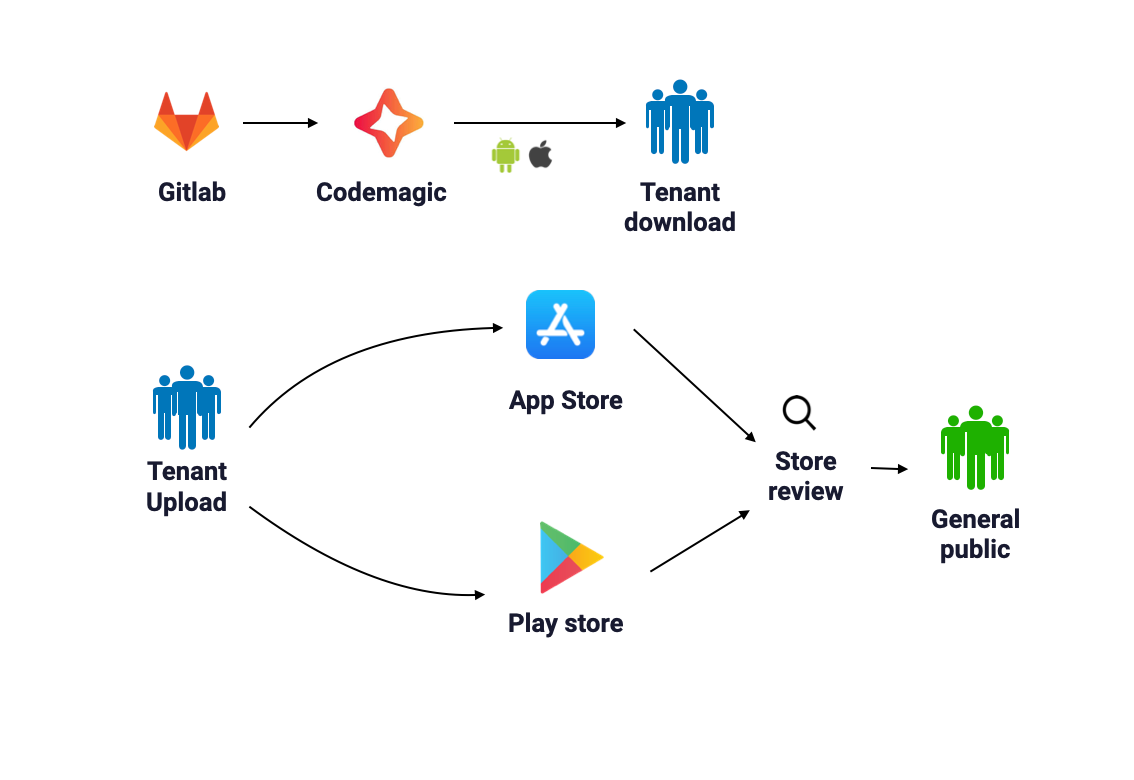
For higher environments (PILOT and PROD) we have a different delivery system. Since the credentials to submit new apps in the app store usually remain inside of the bank, we deliver a signed build via Codemagic, after which it can be downloaded and uploaded to the relevant store. After a review period it is made available to the general public.
Delivery for add-to-app
Delivery for the Add-to-app SDK is simpler than the standalone apps, because the promotion over the different environments actually happens when the super app is promoted and tested.
What we will deliver is one SDK , which has already gone through the different testing stages internally at IVS and deemed stable.
The SDK can be configured to connect to different environments at launch, so it can be embedded at any level of the testing process and connect to the right environment. See the startEngine method for your embedding type on how to do that.
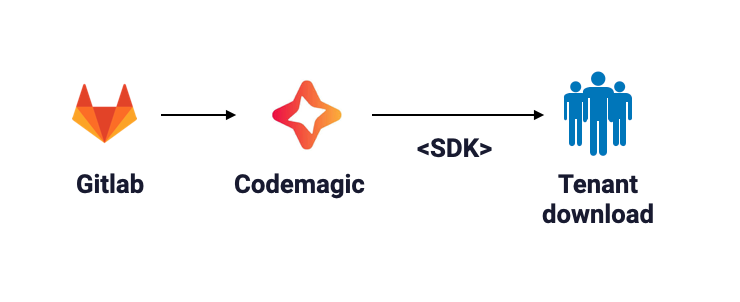
The delivery of the SDK is very similar to how we deliver higher level environments of the standalone app. Our Gitlab pipelines pick up new builds, prepare tags, after which Codemagic will deliver a packaged SDK, ready to be downloaded and embedded.
Add to app package contents
When you download the add-to-app SDK from the codemagic platform you will be downloading a .tgz file.
Unpacking this file will give you a zip file which contains the actual package that you can then use to install in your application.
Important note about this package is that while we call it a SDK for convenience, it is not a SDK in the classical sence of the word. It is in fact a fully embedded application with a separate engine and codebase.
For this reason the iOS package contains 2 framework files, one for debug (with a debugger attached to the embedded application), and one for Release (without the debugger).
Warning
Important note for iOS.
When embedding the SDK into your iOS app (this also counts for react native) and you want to test the release version of your app you should test on a real device. The Flutter engine used by the embedded application in the SDK is not able to run in Release mode on a simulator.
You will get an error about an invalid engine configuration if you do. (Because the Flutter engine will look for the debugger kernel when loaded in a simulator)
Add to app package sizes
Our SDK packages are fully embedded applications. For your convenience all of the required dependencies are included inside of the package. Pre-compilation the sizes are as follows:
| Platform | Package size |
| Android | ~50mb (15mb x86_64 | 15mb arm64-v7a | 15mb arm64-v8a) + ~30mb assets depending on the styleguide + 5mb other dependencies |
| iOS | ~95mb |
The side of the assets on the styleguide is the most important factor in the size of the package. Depending on if vector graphics or raster graphics are used, the size can vary.
Web offering
Customisation of the UI/UX
The web platform is being build on the same design system, styleguide and codebase as the mobile applications and will offer the same flexibility.
Form factor
The web app will be a static web application, delivered as a zip file which can be hosted inside the investsuite cloud solution or on any other web server and on a path of your choice. For example https://your-domain.com/platform or https://platform.your-domain.com/. It will be fully responsive and will be able to run on any browser.
Authentication and Authorization
The web application will support both traditional web authentication flows like OpenID Connect as well as SSO flows. For authorizing transactions the web application will forward the user to the mobile application.
GRPC-web
The web application will use the GRPC-web protocol to communicate with the backend. This protocol is a subset of the GRPC protocol which is supported by our grpc gateway.